XLSTAT2015.1
Publisher Description
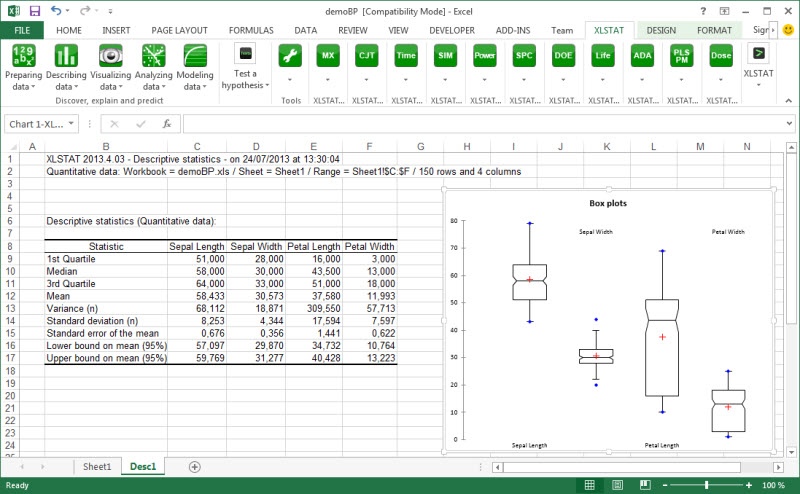
XLSTAT is a complete analysis and statistics add-in for MS Excel that has been developed since 1993. XLSTAT is a modular statistical software built around XLSTAT-Pro - the core product of Addinsoft. The use of Excel as an interface makes XLSTAT a user-friendly and highly efficient statistical and multivariate data analysis package.
It includes regression (linear, logistic, nonlinear), multivariate data analysis (Principal Component Analysis, Discriminant Analysis, Correspondence Analysis, Multidimensional Scaling, Agglomerative Hierarchical Clustering, K-means, K-Nearest Neighbors, Decision trees), correlation tests, parametric tests, non parametric tests, ANOVA, ANCOVA, mixed models and much more. Complementary modules are available for 3D visualization, advanced multivariate analysis (RDA, CCA, MFA), Preference Mapping, Statistical Process Control, Simulation, Time series analysis, Dose response effects, Survival models, Conjoint analysis, PLS modelling, Structural Equation Modelling, OMICS data analysis, Latent Class models...
The XLSTAT statistical analysis software is compatible with all Excel versions from 97 to 2013, and with the Windows 9x till Windows 8 systems. A Mac version is also available on the XLSTAT website.
About XLSTAT
This Math & Scientific Tools program is available in English, French, German, Italian, Japanese, Portuguese, Spanish. It was last updated on 29 September, 2026. XLSTAT is compatible with the following operating systems: Windows.
The company that develops XLSTAT is Addinsoft. The latest version released by its developer is 2015.1. This version was rated by 332 users of our site and has an average rating of 2.4.
The download we have available for XLSTAT has a file size of 72.4 MB. Just click the green Download button above to start the downloading process. The program is listed on our website since 2015-01-20 and was downloaded 42,850 times. We have already checked if the download link is safe, however for your own protection we recommend that you scan the downloaded software with your antivirus. Your antivirus may detect the XLSTAT as malware if the download link is broken.
How to install XLSTAT on your Windows device:
- Click on the Download button on our website. This will start the download from the website of the developer.
- Once the XLSTAT is downloaded click on it to start the setup process (assuming you are on a desktop computer).
- When the installation is finished you should be able to see and run the program.
Program Details
General
System requirements
Download information
Pricing
Version History
version 2015.1
posted on 2015-01-20
New functions added in data analysis, time series, conjoint analysis and sensory analysis, machine learning, latent class cluster & regression models, heatmaps, omics data analysis, CATA data analysis, K-Nearest-Neighbors clustering, Cochran exact and Monte Carlo methods
version 2007
posted on 2007-03-22
All modules are now included in one file
